Look closer
A sign in the background. A distinctive rooftop. Details you’d scroll past can point to a place. Let the AI look for them.
THE CLUES ARE ALREADY THERE GeoFindr.
A story. A screenshot. A place they didn’t tag.
Follow the clues and find out where with GeoFindr.
App demos · Tap a photo to reveal the place
There’s more to the pictureNo tag. No context. Just enough detail to make you wonder.
A sign in the background. A distinctive rooftop. Details you’d scroll past can point to a place. Let the AI look for them.
THE CLUES ARE ALREADY THEREThat café in a story. That view in a post. That street you almost recognize. Start with the photo that made you wonder.
ONE PHOTO. A NEW LEAD.Turn a possible match into a place you can explore. Check the map, look around and save the spots that catch your eye.
FROM WONDERING TO EXPLORINGSome photos make you pause. GeoFindr gives you a way to go a little further: read the clues, explore possible matches and keep what you find.
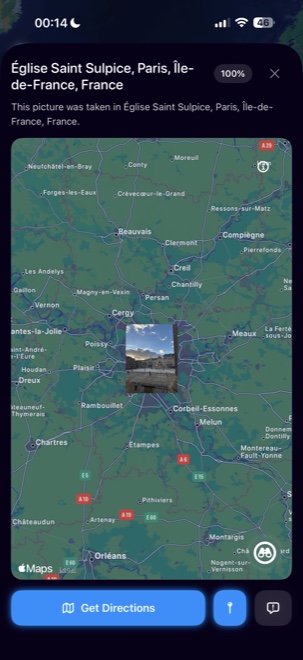
Pick an image from your gallery or share it straight to GeoFindr. A screenshot works too.
The AI reads the scene and suggests places that match its visual details.
Check the result on the map, explore the surroundings and keep your discovery.
GeoFindr’s AI looks for visual clues: buildings, signs, vegetation and landscapes. It connects those details to possible locations and shows the matches on a map.
That’s where the curiosity starts. GeoFindr analyzes what’s visible in the image, so you can try a screenshot or an old photo even when there’s no location tag or embedded GPS data.
It depends on the clues. A distinctive building or street gives the AI more to work with than a blank wall. Results are estimates to check, and GeoFindr may suggest more than one possible match.
Download GeoFindr from the App Store. In-app purchases offer analysis credits or a Premium subscription with unlimited analyses. Prices and terms are shown in the app before you buy.
GeoFindr is currently available on iPhone. The download button takes you straight to its App Store page.
THAT PHOTO IS STILL ON YOUR MIND.GeoFindr for iPhone · In-app purchases